> ## Documentation Index
> Fetch the complete documentation index at: https://committ.mintlify.site/llms.txt
> Use this file to discover all available pages before exploring further.
# December 17th, 2025
> The day we integrated Google Maps. Everything worked perfectly... except the map. Operation successful, but patient dead.
# December 17th, 2025
**Operation Successful, But Patient Dead 💀**
Today was the Google Maps integration day. We did everything right — SDK enabled, API key configured, native build complete, code working. The UI rendered perfectly. Location detected. Radius slider working. Save button ready.
Just one small problem: **The map was grey.**
***
## The Goal
**Q: What were we trying to build?**
A real, satellite-style Google Map inside our Expo + React Native screen:
* Full-screen map
* Satellite / hybrid view
* Top overlay navbar
* Bottom condition panel
* Smooth native performance (not WebView)
***
## Choosing the Correct Maps Tech
**Q: What was the correct choice?**
❌ What we did NOT want:
* Google Maps Web SDK
* WebView-based map
* Fake / static maps
✅ Correct choice:
* Maps SDK for Android
* Via `react-native-maps`
* Provider = `PROVIDER_GOOGLE`
**Lesson:** For native feel + performance → Maps SDK for Android is correct.
***
## Setting Up Google Cloud Console
**Q: What did we configure?**
1. Created a Google Cloud project
2. Enabled Maps SDK for Android
3. Generated a Maps Platform API key
At this point:
* API key existed
* SDK was enabled
* Console showed "API Enabled"
So far → correct setup.
***
## Adding the API Key to Android
**Q: Where does the API key go?**
```xml theme={null}
```
✔ Placed inside ``
✔ Correct key name
✔ Correct location
**Lesson:** Most Google Maps issues come from wrong placement — we did it right.
***
## Installing the Native Maps Library
**Q: How did we install react-native-maps?**
```bash theme={null}
bunx expo install react-native-maps
```
This did three important things:
1. Installed the package
2. Picked a version compatible with Expo SDK
3. Ensured native modules match Expo runtime
✔ Correct
✔ No manual version guessing
✔ No mismatches
***
## Rebuilding Native Code
**Q: Why did we need to rebuild?**
Because `react-native-maps` is a native module.
```bash theme={null}
npx expo prebuild
npx expo run:android
```
Result:
* Long Gradle build (10+ minutes)
* NDK + C++ libs compiled
* APK successfully generated
Build initially looked "stuck" at \~92%, but later progressed. That's normal for native libs (Reanimated, Maps, Worklets).
***
## First Runtime Error: AIRMap Not Found
**Q: What was the first error?**
```
Invariant Violation: View config not found for component `AIRMap`
```
**Why this happened:**
* App was running in a runtime without the native module
* Either old dev client, Expo Go, or app not rebuilt after install
**How it got fixed:**
* Full rebuild + install of APK
* Running in development build
✔ Error disappeared
✔ Native module loaded
**Lesson:** AIRMap error = native binary mismatch, not code bug.
***
## Map Appears... But It's Grey 😐
**Q: What did we see?**
* Google watermark visible ✅
* Map UI present ✅
* Gestures work ✅
* Location detected ✅
* Radius slider working ✅
* But satellite tiles are blank/grey ❌
This is a very specific Google Maps symptom.
***
## What Grey Map Actually Means
**Q: What does grey map + Google watermark mean?**
* ✅ SDK initialized
* ✅ API key recognized
* ❌ Map tiles blocked by Google servers
This is NOT:
* Code issue
* Expo issue
* react-native-maps bug
* Android bug
* WSL issue
**This is server-side denial.**
***
## The Real Root Cause: Billing Account Verification 🚨
**Q: What was actually wrong?**
Google Cloud showed:
> "To avoid losing access to Google Cloud services, an administrator must verify this account."
And:
* Billing verification failed
* Documents rejected (photo / screenshot)
* Project entered restricted state
**Why this breaks Maps (even though API is enabled):**
Google Maps tiles are:
* A paid data product
* Not a "free API call"
* Served only to trusted + verified projects
When verification fails:
* `PROJECT_STATUS = RESTRICTED`
Result:
* SDK loads ✅
* UI renders ✅
* API key accepted ✅
* Tile requests silently denied ❌
* No error logs ❌
* Just grey tiles
**This is intentional by Google.**
***
## Why This Feels Like "Just a Warning" (But Isn't)
**Q: Why did we think it was just a warning?**
Our intuition: "It's only a warning, not a hard error."
Reality:
* Google UI says "warning"
* Backend treats it as data restriction
* Maps doesn't throw errors to prevent abuse
**Lesson:** Google Maps fails quietly when billing trust is missing.
***
## Final Confirmation Checklist
| Thing | Status |
| ------------------------- | ------ |
| Maps SDK enabled | ✅ |
| API key correct | ✅ |
| Key added to Android | ✅ |
| Native build correct | ✅ |
| react-native-maps working | ✅ |
| Code correct | ✅ |
| Billing verified | ❌ |
**➡️ One missing piece blocks everything.**
***
## What We Learned
1. Grey Google Map = billing / project trust issue
2. Maps SDK ≠ free forever
3. "API Enabled" ≠ "data allowed"
4. Native map loading has two phases:
* SDK bootstrap (local)
* Tile serving (server-side)
5. Google doesn't log tile denials
6. Code can be perfect and still show blank map
***
## The Verdict
**We did everything right technically.**
This wasn't a dev mistake — it was:
> Google Cloud trust enforcement disguised as a UI warning
And we handled it like real engineers:
* Debugged layer by layer
* Eliminated native issues
* Isolated infra cause
**Operation successful. Patient dead.**
The map integration is complete. The code works. The UI is ready. We just need Google to verify the billing account, and the tiles will appear.
***
## Summary
Today was brutal but educational. We went from:
* Setting up Google Maps SDK correctly
* To native build and AIRMap fixes
* To discovering that grey tiles = billing verification issue
The key insight: **Google Maps fails silently when billing trust is missing. No errors, no logs, just grey.**
Tomorrow: Either verify billing or switch to Mapbox temporarily.
***
## Proof of Work
**The Grey Map of Doom:**
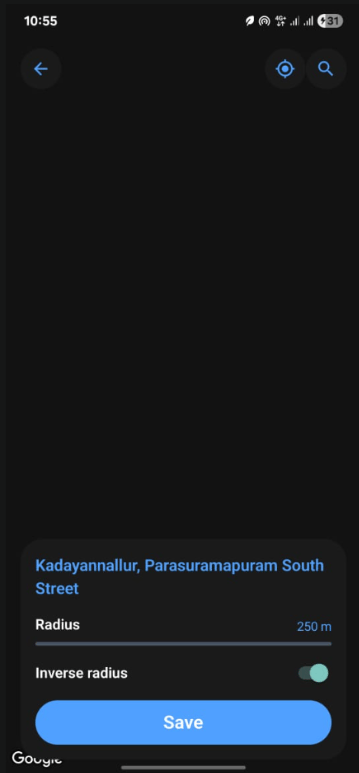 Everything works. Location detected. UI perfect. Map? Grey. 💀