> ## Documentation Index
> Fetch the complete documentation index at: https://committ.mintlify.site/llms.txt
> Use this file to discover all available pages before exploring further.
# December 20th, 2025
> The real blocker wasn't Maps. It was money. UPI doesn't work for Google Maps SDK billing.
# December 20th, 2025
**The Real Blocker Wasn't Maps — It Was Money**
On the third day, we stopped touching code. We stared at Google Cloud Console instead.
And we found what no tutorial clearly tells you.
***
## The Discovery
**Q: What did we find?**
**UPI / GPay does NOT work for Google Maps SDK billing**
 Even though:
* Billing status showed **Active**
* APIs were **Enabled**
* Console didn't throw visible errors
***
## The Silent Block
**Q: How does Google actually handle this?**
Google silently blocks map tile serving unless:
1. You add an **international Visa or MasterCard**
2. With **auto-payment / e-mandate enabled**
3. **RBI-compliant recurring payments** allowed
***
## What We Tried
**Q: Did you try other cards?**
Yes. I even tried my brother's Visa card.
Even though:
* Billing status showed **Active**
* APIs were **Enabled**
* Console didn't throw visible errors
***
## The Silent Block
**Q: How does Google actually handle this?**
Google silently blocks map tile serving unless:
1. You add an **international Visa or MasterCard**
2. With **auto-payment / e-mandate enabled**
3. **RBI-compliant recurring payments** allowed
***
## What We Tried
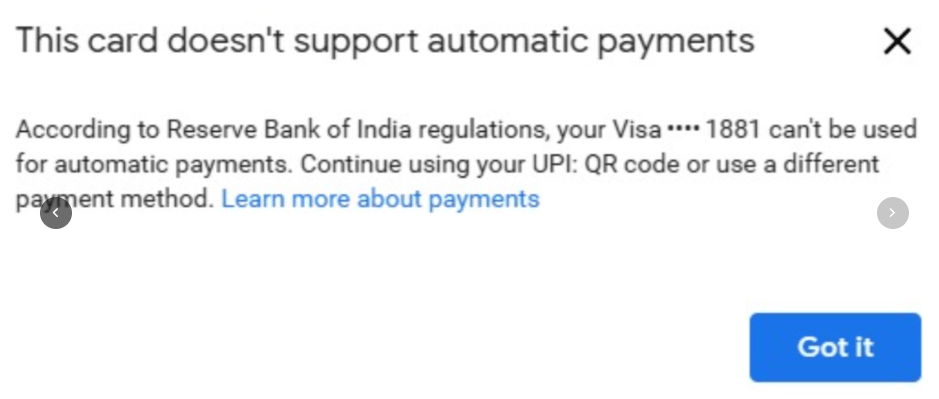
**Q: Did you try other cards?**
Yes. I even tried my brother's Visa card.
 It failed too — because auto-debit wasn't enabled on that card.
 ***
## The Clarity Moment
**The map wasn't broken. The setup wasn't wrong. The payment method was.**
But for the first time in three days, I had clarity.
It still hasn't started working yet — but at least now I have hope.
***
## The India-Specific Gotcha
**Q: Why is this especially painful for Indian developers?**
| Payment Method | Works for Maps SDK? |
| -------------------------- | ------------------- |
| UPI / GPay | ❌ No |
| Indian debit card | ❌ Usually no |
| Visa/MC without auto-debit | ❌ No |
| Visa/MC with e-mandate | ✅ Yes |
Your billing account can show "Active" while still silently blocking API calls.
**The payment method matters more than the status badge.**
***
## Technical Summary
For anyone hitting the same wall:
```
Problem: Google Maps shows blank grey tiles
Error: INVALID_ARGUMENT – Authorization Failed
Root Cause: Indian payment methods (UPI/GPay) don't work for Maps SDK billing
Solution:
1. Add international Visa/MasterCard to billing
2. Enable auto-debit / e-mandate on the card
3. Ensure RBI-compliant recurring payments are allowed
```
***
## What These Three Days Taught Me
**Q: What are the key lessons?**
1. A blank map doesn't mean a frontend bug
2. Logs matter more than assumptions
3. Cloud platforms fail silently, especially billing
4. India-specific payment rules can break global services
5. Building real things feels lonely before it feels rewarding
***
## Where I Am Now
It still isn't working.
But now I know why.
And that's enough to keep going.
Because these three days weren't wasted — they taught me things no quick tutorial or exam ever did.
***
## Summary
Today was the breakthrough:
* Stopped touching code, started reading billing console
* Discovered UPI/GPay doesn't work for Maps SDK
* Understood why "Active" billing can still block tile serving
The key insight: **Google Maps fails silently when billing trust is missing. No errors, no logs, just grey.**
Next step: Get a card with auto-debit enabled and verify billing properly.
***
## The Verdict
**We did everything right technically.**
This wasn't a dev mistake — it was:
> India-specific payment infrastructure colliding with Google's global billing requirements
Three days. One grey map. Zero code bugs.
Sometimes the hardest bugs aren't in your code at all.
***
## The Clarity Moment
**The map wasn't broken. The setup wasn't wrong. The payment method was.**
But for the first time in three days, I had clarity.
It still hasn't started working yet — but at least now I have hope.
***
## The India-Specific Gotcha
**Q: Why is this especially painful for Indian developers?**
| Payment Method | Works for Maps SDK? |
| -------------------------- | ------------------- |
| UPI / GPay | ❌ No |
| Indian debit card | ❌ Usually no |
| Visa/MC without auto-debit | ❌ No |
| Visa/MC with e-mandate | ✅ Yes |
Your billing account can show "Active" while still silently blocking API calls.
**The payment method matters more than the status badge.**
***
## Technical Summary
For anyone hitting the same wall:
```
Problem: Google Maps shows blank grey tiles
Error: INVALID_ARGUMENT – Authorization Failed
Root Cause: Indian payment methods (UPI/GPay) don't work for Maps SDK billing
Solution:
1. Add international Visa/MasterCard to billing
2. Enable auto-debit / e-mandate on the card
3. Ensure RBI-compliant recurring payments are allowed
```
***
## What These Three Days Taught Me
**Q: What are the key lessons?**
1. A blank map doesn't mean a frontend bug
2. Logs matter more than assumptions
3. Cloud platforms fail silently, especially billing
4. India-specific payment rules can break global services
5. Building real things feels lonely before it feels rewarding
***
## Where I Am Now
It still isn't working.
But now I know why.
And that's enough to keep going.
Because these three days weren't wasted — they taught me things no quick tutorial or exam ever did.
***
## Summary
Today was the breakthrough:
* Stopped touching code, started reading billing console
* Discovered UPI/GPay doesn't work for Maps SDK
* Understood why "Active" billing can still block tile serving
The key insight: **Google Maps fails silently when billing trust is missing. No errors, no logs, just grey.**
Next step: Get a card with auto-debit enabled and verify billing properly.
***
## The Verdict
**We did everything right technically.**
This wasn't a dev mistake — it was:
> India-specific payment infrastructure colliding with Google's global billing requirements
Three days. One grey map. Zero code bugs.
Sometimes the hardest bugs aren't in your code at all.