> ## Documentation Index
> Fetch the complete documentation index at: https://committ.mintlify.site/llms.txt
> Use this file to discover all available pages before exploring further.

# Welcome to CommitT

> A strict, native Android accountability enforcer with real penalties and hardware-grade locks.

# Welcome to CommitT

CommitT is a self-binding accountability system that enforces commitments through hardware-level app blocking, 1Hz GPS geofencing, and automated penalties. Unlike standard to-do apps that rely on willpower, CommitT makes it physically impossible to break your rules.

***

## App Walkthrough & Features

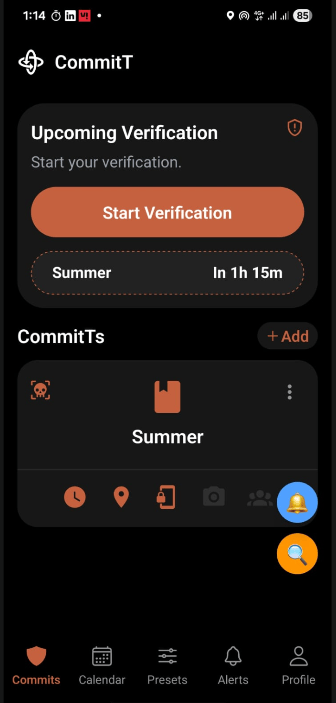
The following step-by-step walkthrough demonstrates the user flow of setting up a new **Gym Commitment**, managing scheduling/overrides, verifying conditions, and viewing logs.

### Phase 1: Creating a Commitment (The Wizard Flow)

We begin by configuring a new accountability task: setting up scheduling, locations, app blocklists, and penalty stakes.

<table>
  <tr>
    <td align="center" valign="top" width="25%">
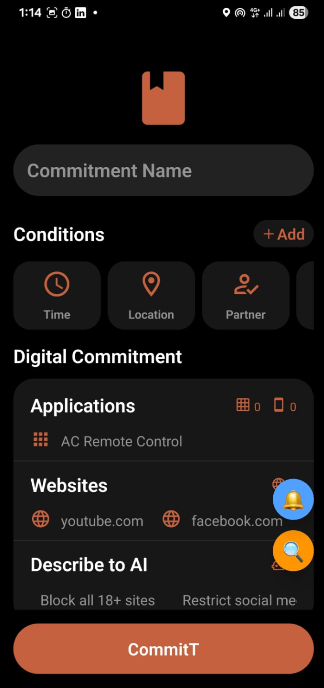
      <b>1. Main Dashboard</b><br />

      <img src="https://mintcdn.com/committ/aZV6C2CJcP8qNgKJ/screenshots/1.png?fit=max&auto=format&n=aZV6C2CJcP8qNgKJ&q=85&s=cc465ec813bbc30d8557880559c605b1" alt="Main Dashboard" width="180" data-path="screenshots/1.png" />

      <br />

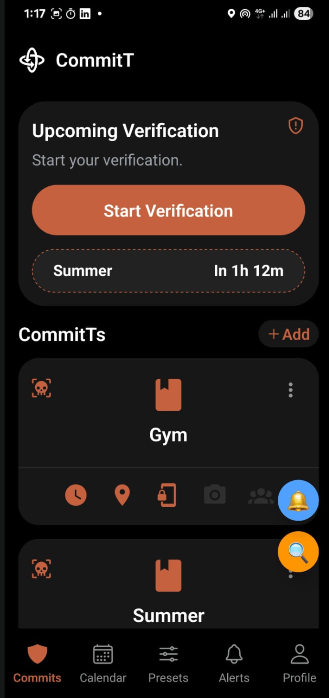
      <sub>Ready to create a new commitment. Tap the <b>+ Add</b> button.</sub>
    </td>

    <td align="center" valign="top" width="25%">
      <b>2. Wizard Configuration</b><br />

      <img src="https://mintcdn.com/committ/aZV6C2CJcP8qNgKJ/screenshots/2.png?fit=max&auto=format&n=aZV6C2CJcP8qNgKJ&q=85&s=4d5c7dba12edbe71dcb58062f66cab84" alt="Wizard Configuration Setup" width="180" data-path="screenshots/2.png" />

      <br />

      <sub>Enter name (e.g. Gym) and basic parameters for the new commitment.</sub>
    </td>

    <td align="center" valign="top" width="25%">
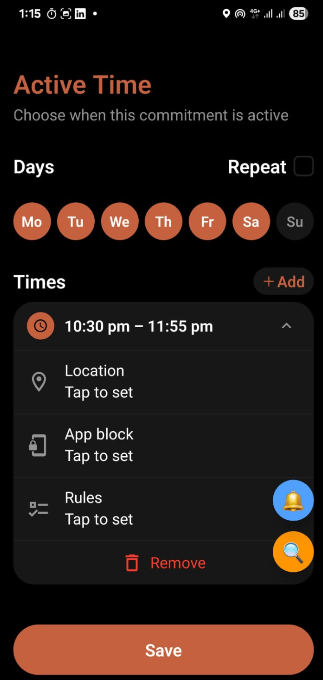
      <b>3. Time Slots & Days</b><br />

      <img src="https://mintcdn.com/committ/aZV6C2CJcP8qNgKJ/screenshots/3.png?fit=max&auto=format&n=aZV6C2CJcP8qNgKJ&q=85&s=e9d77324ecc1dfeebb7aa787a69671f6" alt="Time Slots Setup" width="180" data-path="screenshots/3.png" />

      <br />

      <sub>Add the active days and specific time windows.</sub>
    </td>

    <td align="center" valign="top" width="25%">
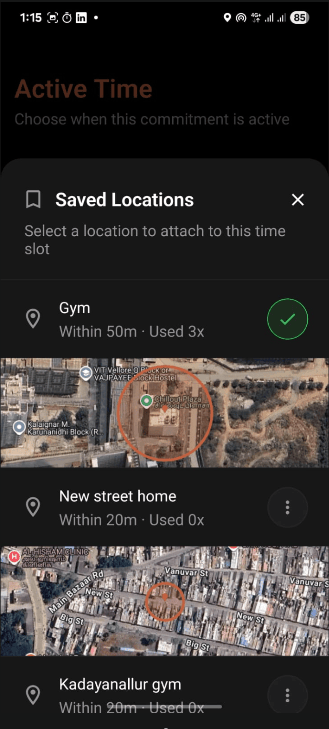
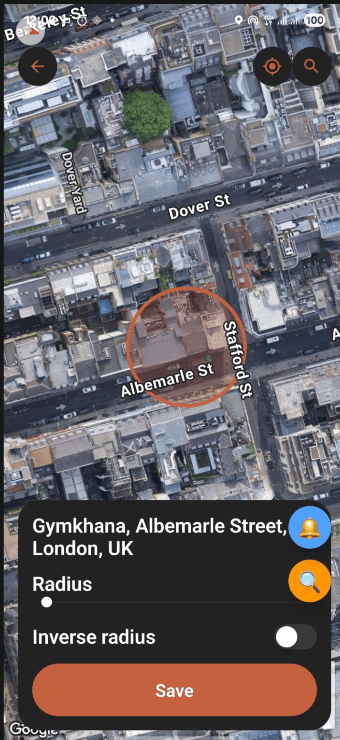
      <b>4. Slot Geofencing</b><br />

      <img src="https://mintcdn.com/committ/aZV6C2CJcP8qNgKJ/screenshots/4.png?fit=max&auto=format&n=aZV6C2CJcP8qNgKJ&q=85&s=ce2be25bf933de715eb4909a6304ac7f" alt="Slot Location Configuration" width="180" data-path="screenshots/4.png" />

      <br />

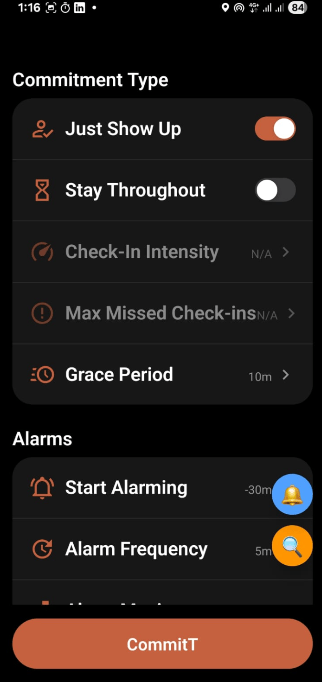
      <sub>Configure location bounds per time slot (selecting <b>Stay Throughout</b> or <b>Just Show Up</b> logic).</sub>
    </td>
  </tr>

  <tr>
    <td align="center" valign="top" width="25%">
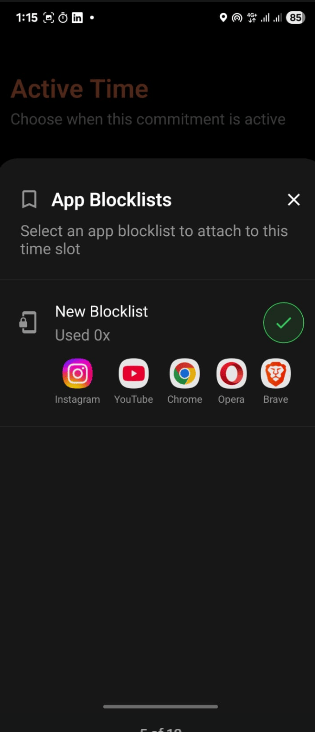
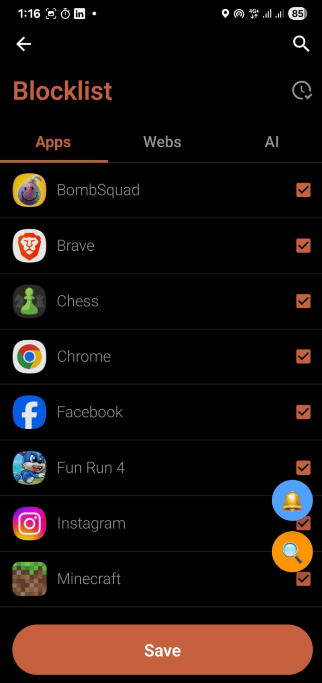
      <b>5. Slot App Blocking</b><br />

      <img src="https://mintcdn.com/committ/aZV6C2CJcP8qNgKJ/screenshots/5.png?fit=max&auto=format&n=aZV6C2CJcP8qNgKJ&q=85&s=6cc4875280a0abb9b785f48d69cad5be" alt="Slot App Blocklist" width="180" data-path="screenshots/5.png" />

      <br />

      <sub>Select which apps to block during this specific time slot.</sub>
    </td>

    <td align="center" valign="top" width="25%">
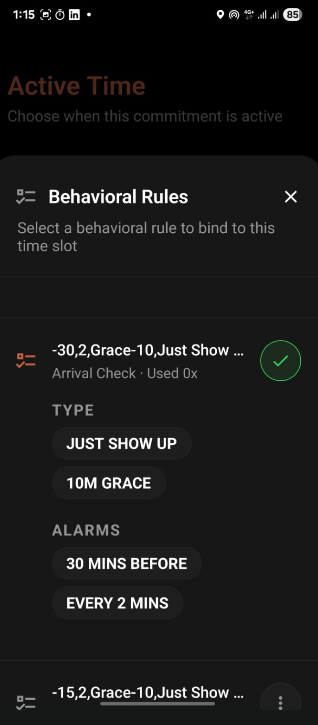
      <b>6. Slot Behavioral Rules</b><br />

      <img src="https://mintcdn.com/committ/aZV6C2CJcP8qNgKJ/screenshots/6.png?fit=max&auto=format&n=aZV6C2CJcP8qNgKJ&q=85&s=7fc147f3fbb99597c3696c2aea8919f0" alt="Slot Rules" width="180" data-path="screenshots/6.png" />

      <br />

      <sub>Configure granular behavioral rules, intensity levels, and alarm timings for the slot.</sub>
    </td>

    <td align="center" valign="top" width="25%">
      <b>7. Universal Location</b><br />

      <img src="https://mintcdn.com/committ/aZV6C2CJcP8qNgKJ/screenshots/7.png?fit=max&auto=format&n=aZV6C2CJcP8qNgKJ&q=85&s=12efe1aa85a9a66fd7bbe742a77bab27" alt="Universal Location Fallback" width="180" data-path="screenshots/7.png" />

      <br />

      <sub>Set an overall location fallback that applies universally to all slots unless overridden.</sub>
    </td>

    <td align="center" valign="top" width="25%">
      <b>8. Universal App Blocking</b><br />

      <img src="https://mintcdn.com/committ/aZV6C2CJcP8qNgKJ/screenshots/8.png?fit=max&auto=format&n=aZV6C2CJcP8qNgKJ&q=85&s=791179a1f2e174990fcdf2e0c4cf19df" alt="Universal App Blocklist" width="180" data-path="screenshots/8.png" />

      <br />

      <sub>Set an overall app blocklist that applies universally to all time slots.</sub>
    </td>
  </tr>

  <tr>
    <td align="center" valign="top" width="25%">
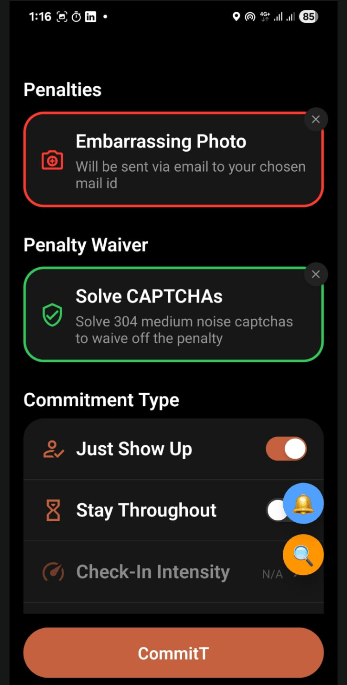
      <b>9. Penalties & Waivers</b><br />

      <img src="https://mintcdn.com/committ/aZV6C2CJcP8qNgKJ/screenshots/9.png?fit=max&auto=format&n=aZV6C2CJcP8qNgKJ&q=85&s=48679a022907f8ebe6668ca44dba1f72" alt="Stakes and Penalty Configuration" width="180" data-path="screenshots/9.png" />

      <br />

      <sub>Configure financial stakes, social penalty images, or waiver redemption options.</sub>
    </td>

    <td align="center" valign="top" width="25%">
      <b>10. Universal Rules</b><br />

      <img src="https://mintcdn.com/committ/aZV6C2CJcP8qNgKJ/screenshots/10.png?fit=max&auto=format&n=aZV6C2CJcP8qNgKJ&q=85&s=245c2370024efb741b8a56d994d0d0b5" alt="Universal Behavioral Rules" width="180" data-path="screenshots/10.png" />

      <br />

      <sub>Define overall behavioral rules (per-slot settings will automatically override these).</sub>
    </td>

    <td align="center" valign="top" width="25%">
      <b>11. Dashboard Updated</b><br />

      <img src="https://mintcdn.com/committ/aZV6C2CJcP8qNgKJ/screenshots/11.png?fit=max&auto=format&n=aZV6C2CJcP8qNgKJ&q=85&s=708d6edfec1f7dcb43eae17b86ff69e0" alt="Dashboard with new Commitment" width="180" data-path="screenshots/11.png" />

      <br />

      <sub>Back to the main dashboard displaying the newly added, active <b>Gym</b> commitment.</sub>
    </td>

    <td width="25%" />
  </tr>
</table>

### Phase 2: Calendar, Presets & Enforcement History

Once commitments are active, CommitT schedules task instances, runs background monitors, and logs enforcement.

<table>
  <tr>
    <td align="center" valign="top" width="25%">
      <b>12. Task Calendar</b><br />

      <img src="https://mintcdn.com/committ/aZV6C2CJcP8qNgKJ/screenshots/12.png?fit=max&auto=format&n=aZV6C2CJcP8qNgKJ&q=85&s=760540010bf031c3bef47201cc4a169f" alt="Scheduled Calendar Instances" width="180" data-path="screenshots/12.png" />

      <br />

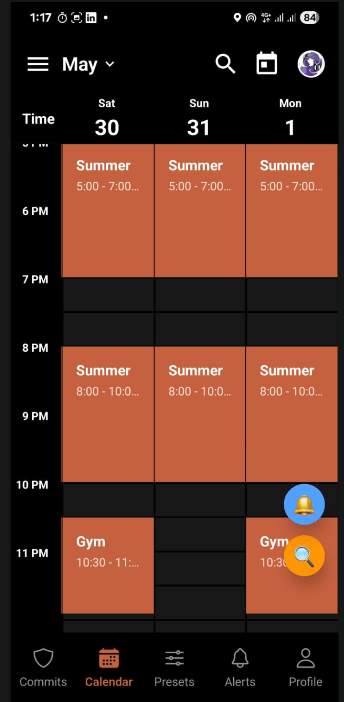
      <sub>View generated task instances (e.g. Gym session scheduled for 10:30 PM - 11:55 PM).</sub>
    </td>

    <td align="center" valign="top" width="25%">
      <b>13. Instance Modal</b><br />

      <img src="https://mintcdn.com/committ/aZV6C2CJcP8qNgKJ/screenshots/13.png?fit=max&auto=format&n=aZV6C2CJcP8qNgKJ&q=85&s=a8d3c3ffd76360892a24112752cad0b2" alt="Instance Action Modal" width="180" data-path="screenshots/13.png" />

      <br />

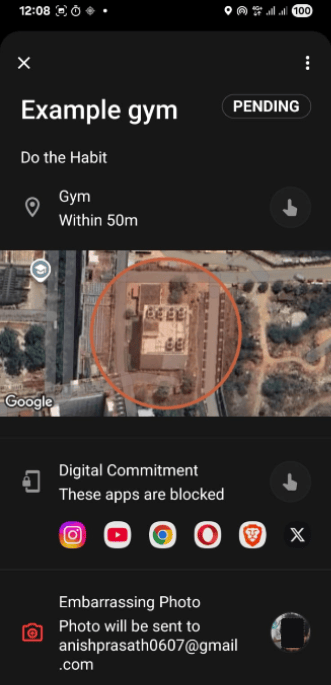
      <sub>Clicking a calendar instance opens the action modal showing details and conditions.</sub>
    </td>

    <td align="center" valign="top" width="25%">
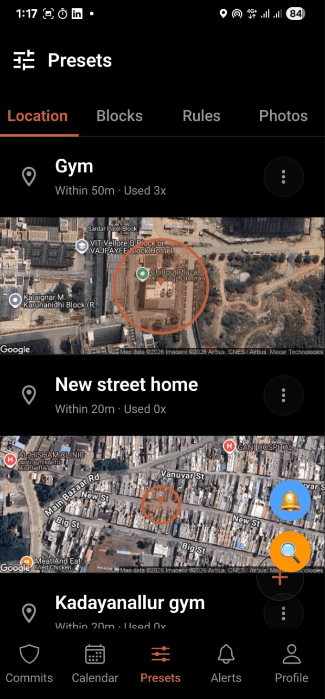
      <b>14. Presets (Location, Blocks, Rules & Photos)</b><br />

      <img src="https://mintcdn.com/committ/aZV6C2CJcP8qNgKJ/screenshots/14.png?fit=max&auto=format&n=aZV6C2CJcP8qNgKJ&q=85&s=ef8e1401051e3060a3d33800d011d454" alt="Presets Management" width="180" data-path="screenshots/14.png" />

      <br />

      <sub>Save repeatedly visited places, app blocks, rules, and photos here to reuse them directly in time slots.</sub>
    </td>

    <td align="center" valign="top" width="25%">
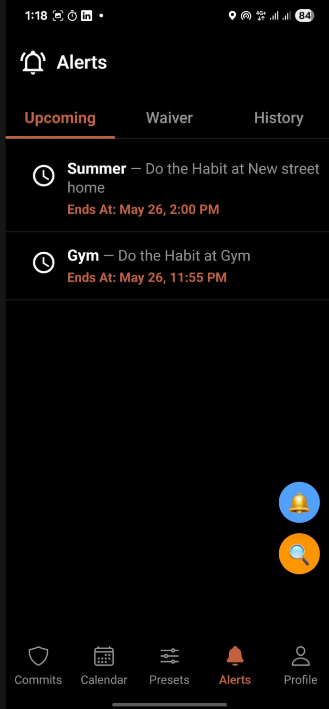
      <b>15. Upcoming Tasks</b><br />

      <img src="https://mintcdn.com/committ/aZV6C2CJcP8qNgKJ/screenshots/15.png?fit=max&auto=format&n=aZV6C2CJcP8qNgKJ&q=85&s=7589aab844a12be1fbb26253aff6fa7f" alt="Upcoming Tasks" width="180" data-path="screenshots/15.png" />

      <br />

      <sub>Shows upcoming tasks and active commitment windows.</sub>
    </td>
  </tr>

  <tr>
    <td align="center" valign="top" width="25%">
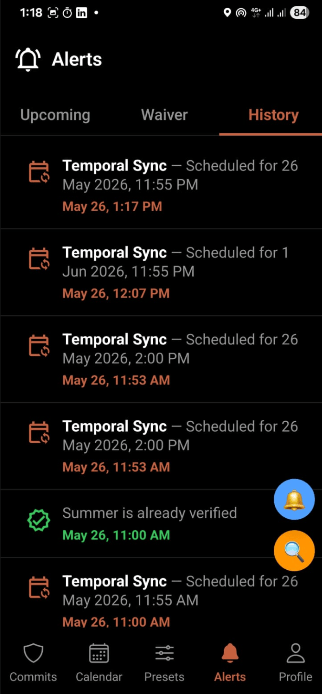
      <b>16. History & Audit Logs</b><br />

      <img src="https://mintcdn.com/committ/aZV6C2CJcP8qNgKJ/screenshots/16.png?fit=max&auto=format&n=aZV6C2CJcP8qNgKJ&q=85&s=80602a04f241767f9b21a75452820815" alt="Compliance Audit Logs" width="180" data-path="screenshots/16.png" />

      <br />

      <sub>History of all scheduled tasks, failures, penalty status, and compliance audit logs.</sub>
    </td>

    <td align="center" valign="top" width="25%">
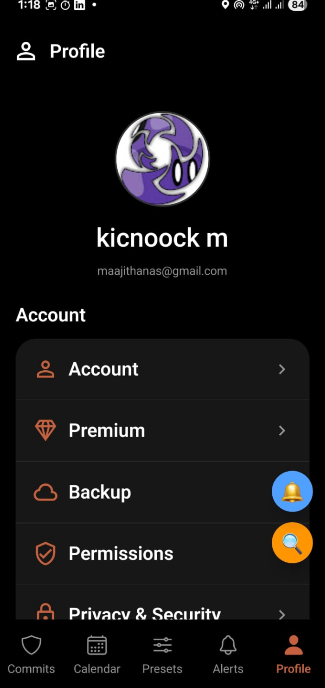
      <b>17. Profile & Settings</b><br />

      <img src="https://mintcdn.com/committ/aZV6C2CJcP8qNgKJ/screenshots/17.png?fit=max&auto=format&n=aZV6C2CJcP8qNgKJ&q=85&s=5f4f182f872d66ff93ab25ee327ec233" alt="User Profile Details" width="180" data-path="screenshots/17.png" />

      <br />

      <sub>Manage active profile settings, account credentials, and enforcer flags.</sub>
    </td>

    <td width="25%" />

    <td width="25%" />
  </tr>
</table>

***

## Real-World Use Cases

See how CommitT handles real-life scenarios to enforce habits, prevent distractions, and lock you in during critical periods.

### 1. Gym Consistency (The "Just Show Up" Model)

**The Problem:** You keep skipping morning workouts. You snooze your alarm at 5:45 AM and tell yourself you'll go tomorrow.

**How CommitT Solves It:**
You configure a commitment named **"Gym Workout"** with the following rules:

* **Time Slot:** Mon, Wed, Fri from `6:00 AM – 7:30 AM`.
* **Location:** *Fitty Gym VIT* coordinates (50-meter geofence radius).
* **Grace Time:** `10 minutes` (you must arrive and check in by 6:10 AM).
* **Alarms:** Armed to start ringing `15 minutes before` (5:45 AM) every `2 minutes` until verified.
* **Penalty:** Stake `$10` or configure an *Embarrassing Photo* to be emailed to your chosen address on failure.
* **Waiver:** Solve `50 CAPTCHAs` within a 1-hour deadline to defuse the penalty if you fail.

```mermaid theme={null}
flowchart TD
    Alarm[5:45 AM:<br/>Alarms Fire] --> Window[6:00 AM:<br/>Gym Window Opens]
    Window --> Arrived{User Arrives at Gym<br/>by 6:10 AM?}
    Arrived -->|Yes| Verified[Verified ✅<br/>Task Passed]
    Arrived -->|No| Waiver{1-Hour Waiver<br/>Active}
    Waiver -->|Solves 50 CAPTCHAs| Passed[Waiver Passed ✅]
    Waiver -->|Deadline Expires| Penalty[Penalty Fired ❌<br/>Stakes Lost]
```

***

### 2. Deep Study Sessions (The "Stay Throughout" Model)

**The Problem:** You go to the library to study, but you end up spending hours doomscrolling Instagram, Twitter, and Reddit on your phone.

**How CommitT Solves It:**
You configure a commitment named **"Library Focus"** with the following rules:

* **Time Slot:** Daily from `8:00 PM – 10:00 PM`.
* **Location:** *VIT Central Library* coordinates.
* **App Blocklist:** Instagram, Twitter, and Reddit are selected.
* **Verification Mode:** **Stay Throughout** (Intensity: Moderate, Max Missed In: 3).
* **How it behaves:**
  1. At 8:00 PM, the accessibility service detects if you try to open social apps and immediately displays a full-screen blocking overlay.
  2. At random times throughout the session (which you cannot predict), the phone sounds a check-in alarm. You must verify that you are still inside the library.
  3. If you step out of the geofence or fail to answer a check-in, it counts as a miss. If you accumulate more than 3 misses, the penalty activates.

```mermaid theme={null}
flowchart TD
    Start[8:00 PM:<br/>Focus Window Starts] --> AppBlocking[Accessibility Service<br/>blocks target apps]
    AppBlocking --> RandomAlarm{Random Check-In<br/>Alarm Sounds}
    RandomAlarm -->|Check GPS Location| LocationCheck{Inside Library<br/>Geofence?}
    LocationCheck -->|Yes| RecordSuccess[Check-In<br/>Logged ✅]
    LocationCheck -->|No / Stale GPS| RecordMiss[Miss Count<br/>+ 1 ❌]
    RecordSuccess --> SessionEndCheck{Is it<br/>10:00 PM?}
    RecordMiss --> MissLimit{Miss Count<br/>> 3?}
    MissLimit -->|Yes| Penalty[Trigger Penalty<br/>or Waiver]
    MissLimit -->|No| SessionEndCheck
    SessionEndCheck -->|No| AppBlocking
    SessionEndCheck -->|Yes| End[Session Complete:<br/>Apps Unblocked]
```

***

### 3. Exam Lock-In Week (The "Strict Mode" Sprint)

**The Problem:** Finals are in a week. You need to lock in and study 8 hours a day. You set up blockers, but you know that when you get stressed on day 3, you will edit or delete the tasks to escape them.

**How CommitT Solves It:**
You configure a high-stakes, non-repeating sprint named **"Finals Lock-in"**:

* **Recurrence:** Uncheck **Repeat** (runs for this week only, then expires).
* **Schedule:** Two daily time blocks: `9:00 AM – 1:00 PM` and `2:00 PM – 6:00 PM`.
* **Enforcement:** Block Apps preset ("Distractions") + AI input: *"Block all entertainment and streaming websites"*.
* **Strict Mode:** **Enabled.** Once saved, the Convex database flags this commitment as immutable. Edit and delete operations are rejected on the server until the week ends.
* **Verification Mode:** **Stay Throughout** (Intensity: Strict, Max Missed In: 1).
* **Penalty:** Stake `$50` + *Embarrassing Photo* penalty.
* **Waiver:** Solve `200 CAPTCHAs` to waive.

```mermaid theme={null}
flowchart TD
    Commit[User Commits Task<br/>with Strict Mode] --> Sync[Convex Locks Task<br/>Constraints on Server]
    Sync --> LocalDB[Task Synced to<br/>Local SQLite Cache]
    LocalDB --> Block[App Blocker<br/>Activated]
    Block --> Attempt{User tries to<br/>delete Task?}
    Attempt -->|Server Checks Lock| Rejected[Convex Backend<br/>Rejects Deletion 🔒]
    Rejected --> Block
```

***

## Feature Index

Here is the complete list of capabilities you can configure with CommitT:

### Setup & Permissions

<CardGroup cols={2}>
  <Card title="OS Permissions Audit" icon="shield-halved" href="/platform/permissions">
    Prerequisite checks for all 8 Android system permissions before activation to guarantee background persistence.
  </Card>

  <Card title="Device Admin Lock" icon="gavel" href="/platform/permissions">
    Enables Device Administrator access to block any attempts to uninstall the application to escape active commitments.
  </Card>

  <Card title="Appear On Top" icon="window-restore" href="/platform/permissions">
    Draws full-screen overlay block screens directly over target applications before their first frame renders.
  </Card>

  <Card title="Battery Optimization Bypass" icon="battery-empty" href="/platform/permissions">
    Disables system battery-saver restrictions so background tasks and verification services stay alive.
  </Card>
</CardGroup>

### Core Configuration

<CardGroup cols={2}>
  <Card title="Task & Instances" icon="copy" href="/platform/config">
    Commitments spawn independent, immutable instances so history records cannot be retroactively modified.
  </Card>

  <Card title="Flexible Time Slots" icon="calendar-days" href="/platform/config">
    Configure multiple target windows per day with custom repetition settings (weekly or one-off sprints).
  </Card>

  <Card title="Per-Time-Slot Attachments" icon="sliders" href="/platform/config">
    Assign unique locations, app blocklists, and rules to individual slots within the same task.
  </Card>

  <Card title="Configuration Presets" icon="bookmark" href="/platform/config">
    Save frequently used Locations, Blocklists, and Rules for one-tap commitment planning.
  </Card>

  <Card title="One-Screen Day Planning" icon="list-timeline" href="/platform/config">
    Configure your entire day's routine—from morning gym to evening study—within a single task calendar.
  </Card>
</CardGroup>

### Verification & Enforcement

<CardGroup cols={2}>
  <Card title="Digital App Blocker" icon="mobile-screen" href="/platform/enforcement">
    Select individual Android applications to block when a commitment window is active.
  </Card>

  <Card title="Web Domain Filter" icon="globe" href="/platform/enforcement">
    Enter specific web domains (e.g., youtube.com) to restrict access during study windows.
  </Card>

  <Card title="AI-Powered Rules" icon="sparkles" href="/platform/enforcement">
    Describe what to block in natural language (e.g., "Restrict all shopping and gaming sites") to auto-configure filters.
  </Card>

  <Card title="1Hz GPS Geofencing" icon="location-dot" href="/platform/enforcement">
    Real-time location checks via a 1Hz GPS stream for sub-second arrival detection.
  </Card>

  <Card title="Just Show Up Mode" icon="shoe-prints" href="/platform/enforcement">
    Verifies your presence once within a custom grace period at the beginning of a window.
  </Card>

  <Card title="Stay Throughout Mode" icon="repeat" href="/platform/enforcement">
    Ensures you remain in place by triggering randomized check-in alarms throughout the session.
  </Card>
</CardGroup>

### Penalties & Waivers

<CardGroup cols={2}>
  <Card title="Durable Cloud Penalties" icon="cloud" href="/platform/penalties">
    Missed verifications arm serverless cloud triggers that execute consequences automatically.
  </Card>

  <Card title="Stake Money" icon="money-bill" href="/platform/penalties">
    Attach real financial stakes to your commitments to increase the cost of failure.
  </Card>

  <Card title="Social Accountability" icon="envelope" href="/platform/penalties">
    E-mail proof photos or video challenges to friends or partners if you default on a task.
  </Card>

  <Card title="CAPTCHA Defusal" icon="brain" href="/platform/penalties">
    Waive scheduled penalties by solving custom batches of CAPTCHAs (configurable from 1 to 400).
  </Card>

  <Card title="Text Transcription Waiver" icon="keyboard" href="/platform/penalties">
    Transcribe a lengthy, complex paragraph of text before the deadline to defuse penalties.
  </Card>

  <Card title="Intensity Redo" icon="bolt" href="/platform/penalties">
    Commit to re-performing the task at a higher difficulty setting to waive the current penalty.
  </Card>
</CardGroup>

### Security & Integrity

<CardGroup cols={2}>
  <Card title="Strict Mode" icon="lock" href="/platform/security">
    Renders active commitments completely immutable at the database layer to prevent panic-edits.
  </Card>

  <Card title="Device Marriage Protocol" icon="mobile" href="/platform/security">
    Binds account sessions to a physical device signature, stopping users from remote-verifying on another phone.
  </Card>

  <Card title="Nuke & Pave Recovery" icon="arrows-rotate" href="/platform/security">
    Automatically wipes local SQLite cache, regenerates schema, and pulls fresh database records on I/O errors.
  </Card>
</CardGroup>