

February 3rd, 2026
The Blueprint is Locked. Now We Build. After weeks of preparation, the full implementation roadmap is now clear. Here are the whiteboard notes that capture the plan: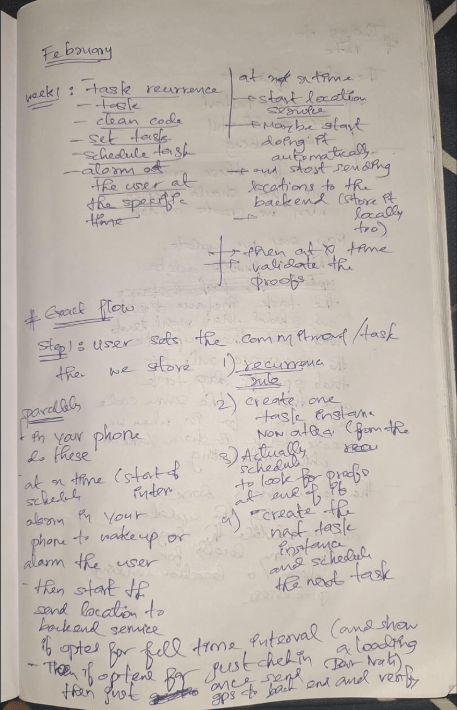
🗓️ Week 1: Core Task & Scheduling Logic
This week is about the backbone of CommitT: creating tasks, storing recurrence rules, and making sure alarms survive device restarts.1. Create Task Flow
2. During Active Task Window
3. Task Completion / End of Instance
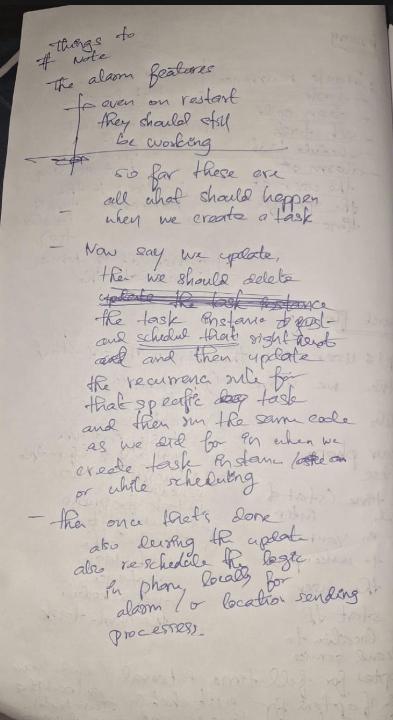
4. Update Task Flow
⚠️ Critical: Alarm Persistence
Alarms must survive device restarts.
Use BOOT_COMPLETED broadcast receiver + re-register alarms on boot.
This was already implemented in January (Day 14) with the withBootReceiver config plugin. We have the foundation; now we wire it to real tasks.
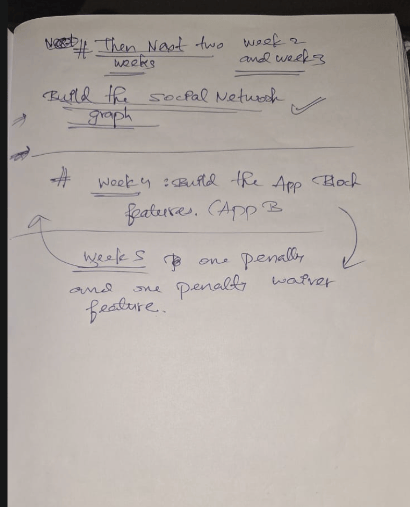
🗓️ Weeks 2 & 3: Social Network Graph
This is where CommitT becomes “Social Stikk”.- Build the social/friend system (add, remove, accept invites)
- Allow assigning tasks to accountability partners
- Visibility controls (public / private / friends-only)
- Proof-of-work feed (friends see your check-ins, can react)
🗓️ Week 4: App Block Features (App B - Digital Commitment)
This is the “make cheating irrational” layer.- Detect app launches (Accessibility Service)
- Block specified apps during task windows
- Show overlay / force return to home screen
- “Request Unlock” flow → all partners must approve
🗓️ Week 5: Penalty & Waiver
The stakes that make it real. Penalty Options (implement at least one):- Monetary (forfeit ₹X)
- Streak loss (reset counter)
- Embarrassing photo sent to partners
- Solve 100 CAPTCHAs
- Write a 3000-word reflection
- Complete a harder replacement task
- Grace period (1 free miss per month)
Next Step
Today: Start implementing Week 1 - Create Task Flow. This means:- Backend: Convex mutations for creating tasks with recurrence rules.
- Frontend: Wire the existing UI to call those mutations.
- Native: Ensure AlarmManager schedules the first instance.
🚀 Today’s Implementation: First Slice of Week 1
The Challenge with AI-Assisted Development
The thing with working with AI is that at the moment, whatever you do seems good, but after a few months or days of work, the quality of work can seem really bad. To avoid this, we need to:- Write production-level code from day one
- Follow best practices rigorously
- Plan before coding - each slice should be crystal clear
Today’s Slice: Create Task with Recurrence Rule
User Flow:- ✨ First time commit → Create recurrence rule → Create first task instance
- 🔄 Update existing → Validate changes → Update rule & reschedule
- ❌ Delete → Cancel all scheduled instances
Validation Requirements (Before Any Create/Update)
Step-by-Step Production Implementation
Step 1: Backend - Validation Logic (validators.ts)
Create pure functions to validate:
- ✅ At least one time condition exists in the rule
- ✅ No overlapping tasks in the same time slot for this user
- ✅ Time slots are valid (start < end)
Step 2: Backend - Recurrence Calculator (recurrence.ts)
Create pure function getNextOccurrence():
- Takes: recurrence rule + base date
- Returns: next
{ start: Date, end: Date }
Step 3: Backend - Modify createTask Mutation
Wire everything together in a single transaction:
Step 4: Backend - Scheduled Function (onInstanceEnd)
This runs automatically at each instance’s end time:
Files to Create/Modify Today
Quality Checklist
- All business logic in pure functions (testable, no side effects)
- Proper TypeScript types for all data structures
- Error handling with meaningful messages
- No hardcoded values - all config in constants
- Atomic transactions - if one step fails, nothing is committed
- Idempotent operations where possible