

January 8th, 2026
1. What problem are we even solving with React Native + Expo?
We want to build real native mobile apps (Android/iOS) without writing all UI logic twice (Kotlin + Swift). React Native solves this by:- Writing app logic + UI description in JS/TS
- Letting native code render actual native UI
- Reduce setup pain
- Provide ready-made native capabilities
- Hide platform complexity until needed
2. What exactly is Expo?
Expo is NOT a replacement for React Native. Expo is:- A toolchain
- A prebuilt native runtime
- A workflow manager
To run React Native apps with minimal native setup and safe defaults.Expo gives you:
- A native shell (already built)
- Hermes JS engine
- Common native APIs (camera, mic, location, etc.)
- Tooling to build, run, and debug
3. Does Expo combine frontend React Native code and backend Kotlin code?
No. Very important distinction:- Kotlin on Android (inside the app) = native client-side code
- Kotlin backend (server) = completely separate process
- HTTP / WebSockets
- APIs
4. Can Expo alone build a full production app?
Yes. In managed Expo, you can build full apps with:- Camera
- Microphone
- Location
- Maps
- Storage
- Sensors
- Notifications
- Seeing
android/ - Writing Kotlin
- Touching Gradle
- AndroidManifest
- Permissions
- Native modules
- Hermes engine
5. Then why does Android even exist if I don’t see it?
Android always exists. Expo hides it. Internally, Expo Go and managed Expo apps already contain:- A full Android project
- Gradle build
- Native binaries
- Expo already ran Gradle
- The native shell is prebuilt
6. What is Expo Go, technically?
Expo Go is:- A prebuilt Android app
- Compiled by Gradle by the Expo team
- Published to Play Store
- Not building an app
- Sending JS code to an already-built native container
- Chrome (prebuilt) running different websites (JS)
7. What does “eject” or “prebuild” actually mean?
Ejecting means:Stop hiding the native project and give me full control.After eject:
android/folder appearsAndroidManifest.xmlis visible- Gradle files are visible
- You can write Kotlin / Java
- You are still using Expo
- You are just in Expo Bare workflow
8. Why does AndroidManifest.xml suddenly appear after prebuild?
Because:
- Android cannot exist without a manifest
- Permissions, services, activities must be declared at build time
- Expo auto-generated it for you
- You own it
9. What exactly is React Native code?
React Native code is JavaScript / TypeScript. It:- Describes UI
- Contains business logic
- Handles state
- Decides what should change
- Render pixels
- Talk directly to hardware
- Call OS APIs
10. How does JS actually run inside a mobile app?
Through a JavaScript engine. In modern React Native, that engine is Hermes. Hermes:- Is written in C++
- Is compiled into native machine code
- Runs inside the Android app
- Executes JS instructions
11. Does Hermes need hardware to run calculations?
Yes. Hermes:- Runs on CPU
- Uses RAM
- Is scheduled by the OS
- Hermes uses hardware
- Hermes does not need OS APIs for logic like
if,+, loops
- JVM running Java
- ART running Kotlin bytecode
12. Does JS code get converted into native code?
No. JS is never converted into Kotlin or machine instructions. Instead:- Hermes executes JS
- Native code executes native tasks
13. Then how does UI get rendered?
Through instruction passing, not conversion. Flow:14. What about pure logic like calculations or if/else?
Those stay entirely in the JS world.15. Why is React Native sometimes considered “slower”?
Because:- Crossing the JS ↔ native boundary has overhead
- UI rendering is native
- Animations often bypass JS
- Most apps are network-bound, not CPU-bound
16. Where does Gradle fit into all this?
Gradle is a build-time tool, not a runtime. Gradle:- Compiles native Android code (Kotlin, Java, C++)
- Compiles Hermes engine binaries
- Compiles React Native native runtime
- Packages JS bundle as an asset
- Produces APK / AAB
- Does NOT execute JS
- Does NOT run Hermes
- Does NOT render UI
17. So what exactly does Gradle build in a React Native app?
Gradle builds:- The native container
- That embeds Hermes
- That knows how to run JS
- That knows how to render UI
- A script shipped inside the app
18. Is Gradle needed even for “pure” React Native apps?
Always. Android apps cannot exist without Gradle. The only difference:- Sometimes you run Gradle
- Sometimes Expo already ran it for you
19. What does a bare React Native / Expo Bare project contain?
Two worlds in one repo:20. Final mental model (this is the real one)
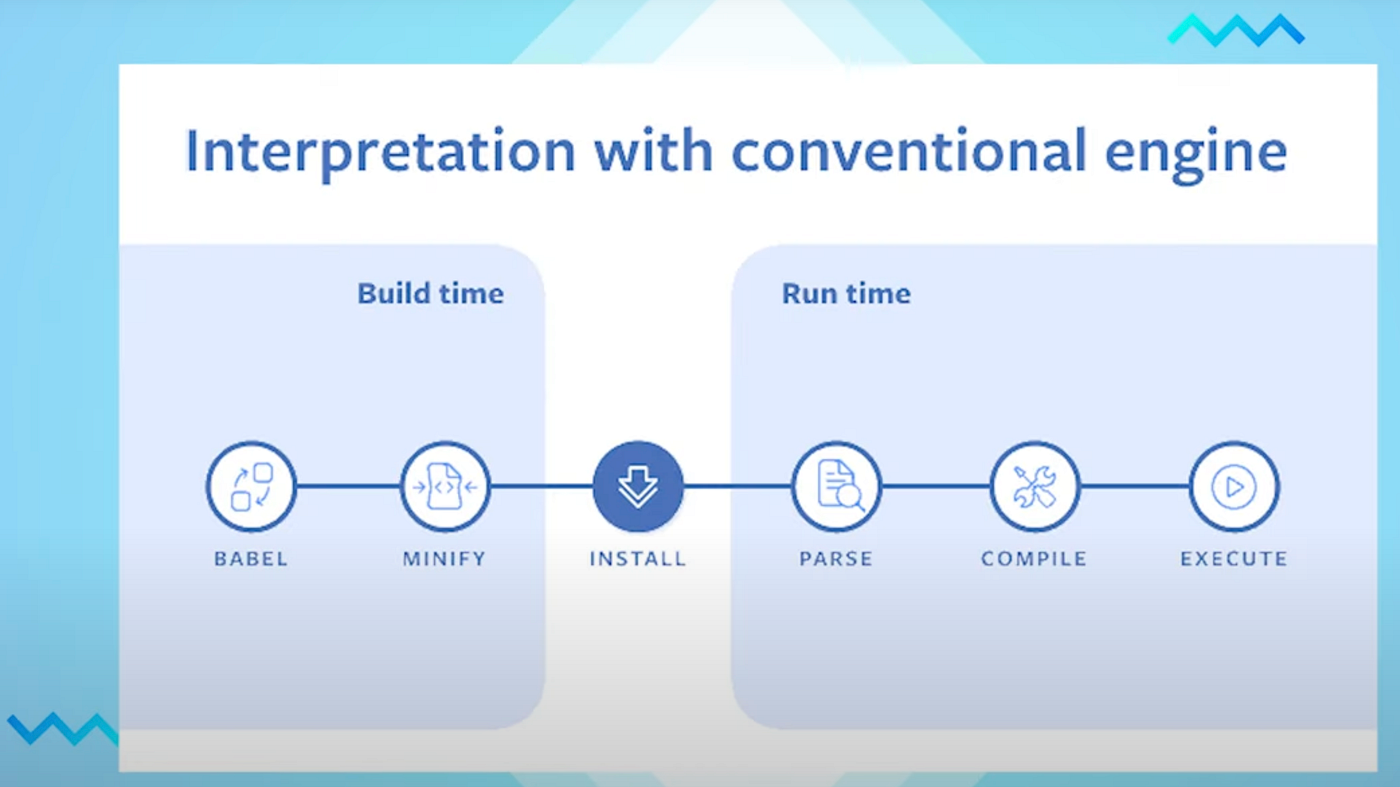

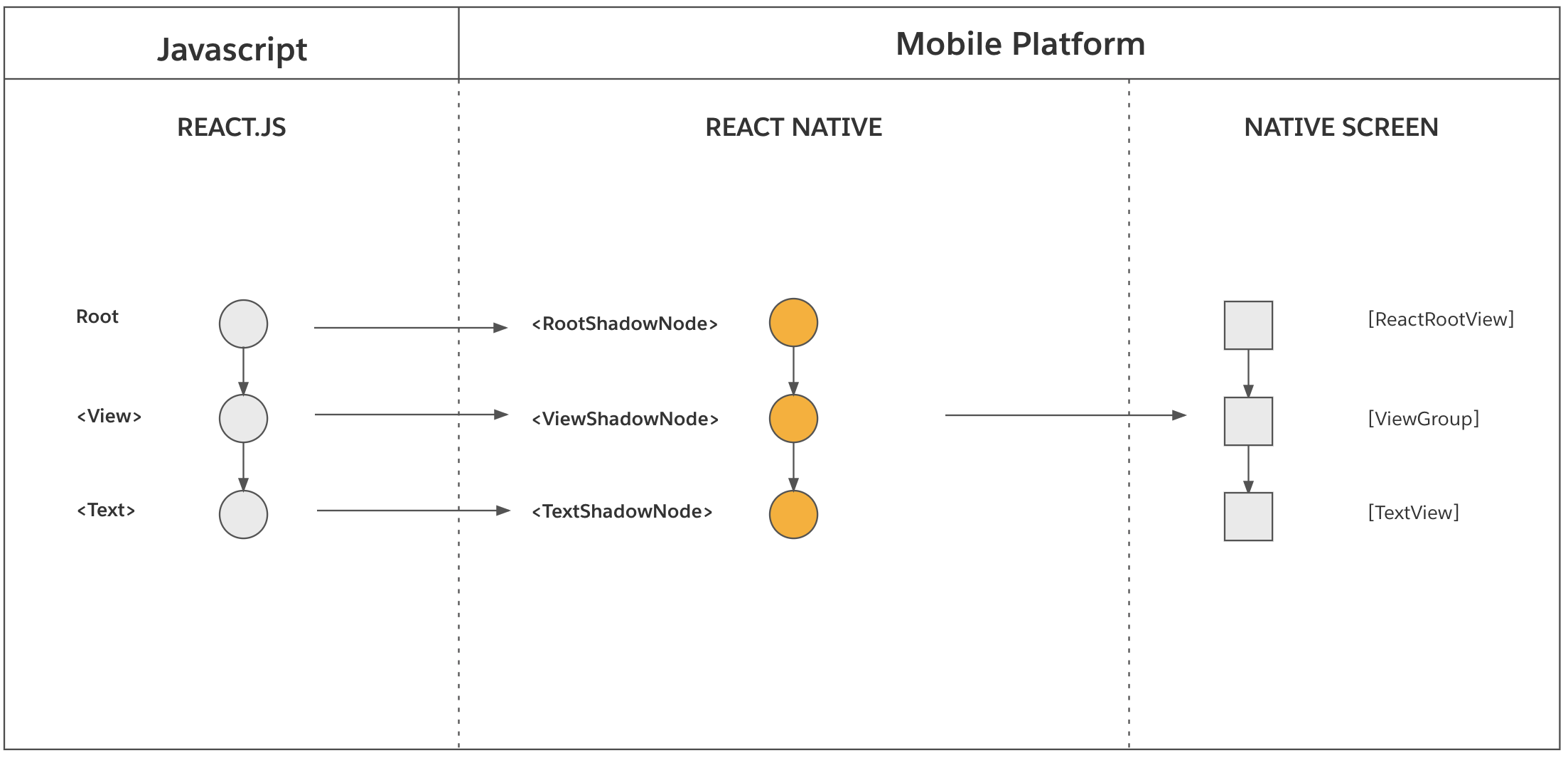
Final engineer-level summary
A React Native app is a native Android application built by Gradle that embeds a native JavaScript engine (Hermes). At runtime, Hermes executes JavaScript logic on the CPU, while native Android code renders UI and interacts with the OS and hardware. Expo simplifies this by providing a prebuilt native shell and hiding platform details until native customization is required, at which point ejecting exposes the full Android project without changing the core execution model.
Closing note
This is deep system-level understanding. We’re no longer learning “React Native” — we’re learning how mobile runtimes work. Next topics to explore:- Thread-level model (JS thread vs UI thread)
- Compare RN vs Flutter at runtime
- Walk through a real APK