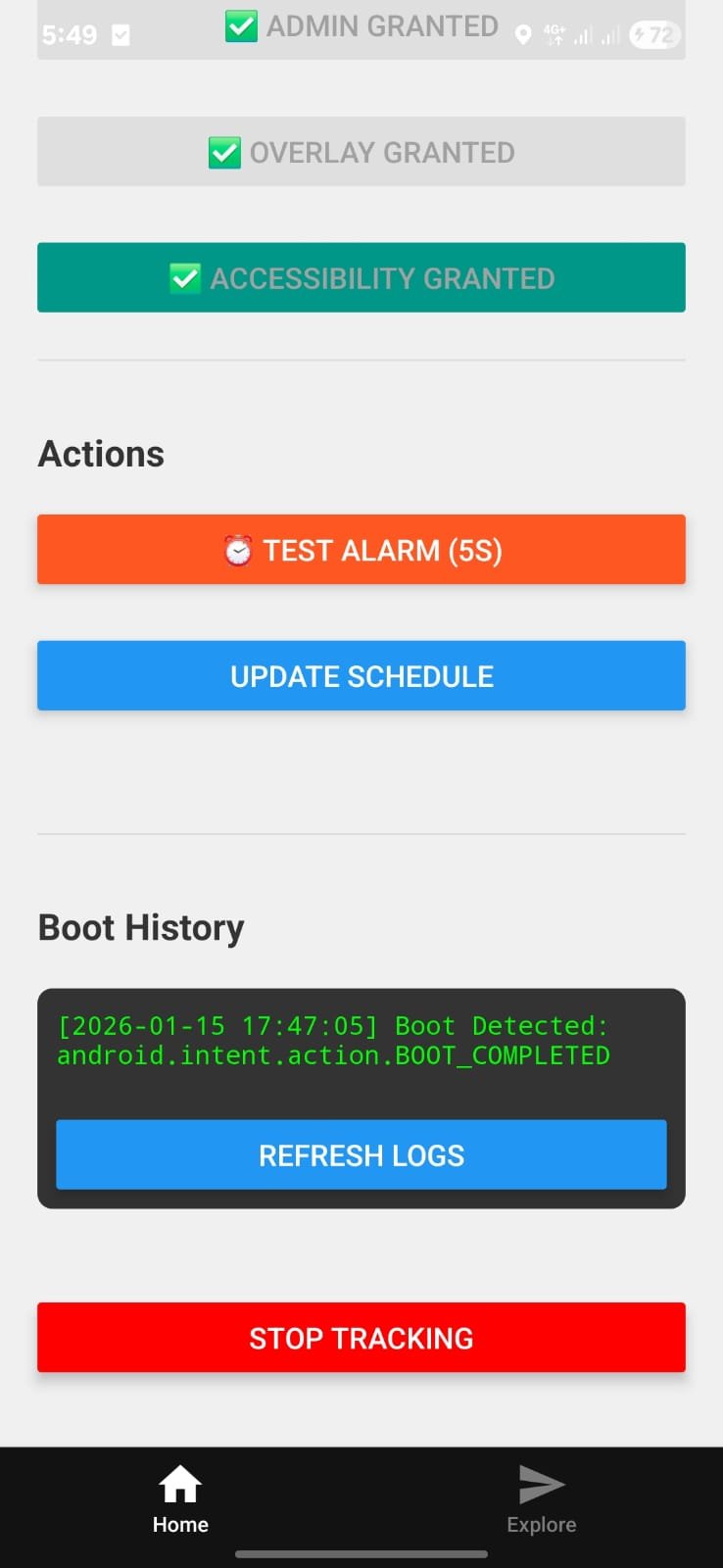
Project: The “Unkillable” Accountability App
Core Philosophy: A React Native app is just a UI. To control the phone (block apps, prevent uninstall, auto-start), we needed to break out of the JavaScript sandbox and write Native Kotlin Code. We achieved this using Expo Config Plugins, which allows us to inject this native code automatically during the build process, keeping our source clean and upgradeable.🛠️ The Architecture: “The 5 Pillars”
We built five distinct native systems, each isolated in its own plugin directory.1. The Bridge (withHelloModule)
Purpose: The communication line between React Native (JS) and Android (Kotlin).
HelloModule.kt: A native module that exposes methods to JS.- Permission Manager: We expanded this module to be our central “Permission Center”. It contains the logic to:
- Check/Request Device Admin.
- Check/Request Overlay Permissions.
- Check/Request Accessibility Services.
- Smart Intents: Instead of crashing or showing a generic error, we wrote logic to deep-link into specific settings pages (like
DeviceAdminSettingsActivity) so the user finds the toggle instantly.
2. The Shield: Device Admin (withDeviceAdmin)
Purpose: To prevent the user from easily uninstalling the app or force-stopping it.
MyDeviceAdminReceiver.kt: A specialBroadcastReceiverthat listens for admin events.device_admin_policies.xml: Defined policies (likeforce-lock) which tells Android “This is a security app”.- Manifest Injection: The plugin automatically adds the
<receiver>tag withBIND_DEVICE_ADMINpermission toAndroidManifest.xml.
3. The Clock: Reliable Alarms (withAlarmModule)
Purpose: Standard JS setTimeout dies when the app is backgrounded. We needed alarms that ring even if the phone is asleep (Doze Mode).
- Technology: Used
setExactAndAllowWhileIdle. This is the “Nuclear Option” for alarms—it forces the phone to wake up even if it’s in deep battery saving mode. AlarmReceiver.kt: Catches the alarm signal to show a Toast (future: play sound/block screen).
4. The Eyes & The Sword: Accessibility & Overlays (withAccessibilityService)
Purpose: To “See” what the user is doing and “Block” them if they misbehave.
MyAccessibilityService.kt: The most powerful part of the app.- Event Listening: Listens for
TYPE_WINDOW_STATE_CHANGEDevents (apps switching). - The Sword (Blocking Logic):
- If
event.packageNameequalscom.instagram.androidorcom.zhiliaoapp.musically(TikTok): - Action: Executes
performGlobalAction(GLOBAL_ACTION_HOME)to instantly kill the app. - Visual: Draws a black “BLOCKED” overlay using WindowManager.
- If
5. Immortality: Boot Receiver (withBootReceiver)
Purpose: If the user restarts their phone to kill the app, the app must rise again.
BootReceiver.kt: Listens forBOOT_COMPLETEDsignal.- Direct Boot: Enabled
directBootAware="true", allowing code to run before the user even types their PIN (Android 7+ feature). - Proof: We implemented a file logger that writes a timestamp to
boot_history.txtimmediately upon boot. JS reads this to prove the wake-up.
⚠️ Challenges & Solutions
We faced specific hurdles typical of advanced Android development:- Configuring
MainApplication.kt:- Problem: New packages need manual linking.
- Solution: We wrote a regex-based plugin helper to parse the Kotlin string and inject
add(MyPackage())dynamically.
- Android 12 Security:
- Problem: Crashes if
android:exportedisn’t declared. - Solution: Ensured every Receiver/Service in our templates had
android:exported="true"explicitly.
- Problem: Crashes if
- Finding Settings Pages:
- Problem: Device Admin settings are buried.
- Solution: Robust try/catch blocks that fall back to general Security Settings if specific intents fail.
🏆 Proof of Work
We achieved a modular, native accountability base capable of blocking apps, preventing deletion, and surviving restarts. Learnings on Bootloaders: We also went deep into understanding the Android Bootloader process to ensure our Boot Receiver hooks in as early as theoretically possible.