

December 9th, 2025
The Day We Got Serious About Structure Today was split into two sessions: 10 AM to 12 PM, then 6 PM to 11 PM. Solid progress on permissions, authentication, and documentation.10:00 AM - 12:00 PM — Morning Session
Permission Page Complete
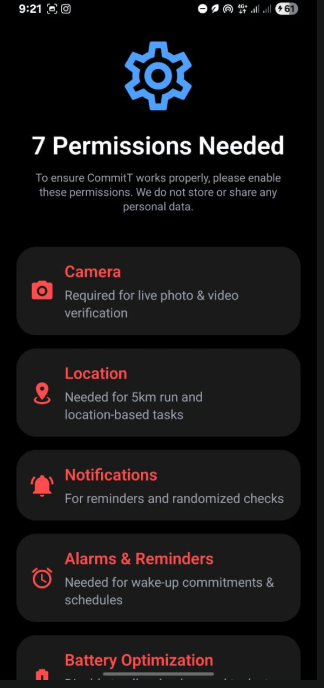
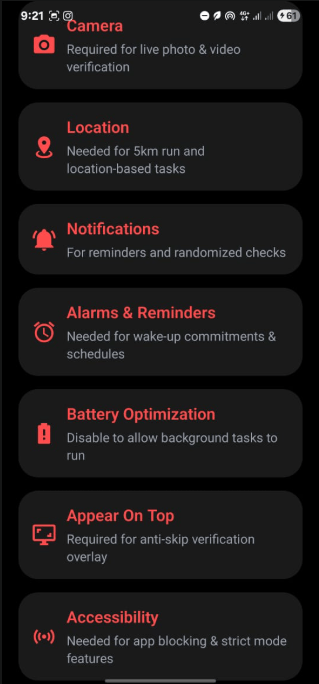
Built the full Permissions Setup UI in Expo Native with all 7 required permissions:- Camera
- Location
- Notifications
- Alarms and Reminders
- Battery Optimization
- Appear On Top
- Accessibility
- Scrollable layout
- Dynamic red/blue title coloring based on permission status
- Clean design using the ConditionCard component
ConditionCard Updates
Updated ConditionCard to support:- Custom title color
- Custom icon color
- Clean, reusable UI for permissions
6:00 PM - 11:00 PM — Evening Session
Core Tasks Identified
Listed the main tasks for the app:- Authentication
- State management
- DB schema planning
- Permission page (DONE)
- Strict Mode UI
- Separate style tokens (padding, colors, radius)
Auth Dependencies Installed
Insidemono/packages/backend, installed:
- better-auth
- @convex-dev/better-auth
- @better-auth/expo
- convex
Created Convex Auth Files
Createdpackages/backend/convex/auth.ts:
Google Cloud Setup
- Created a new Google Cloud Project (CommitT)
- Opened Google Auth Platform
- Set up OAuth consent screen
- Configured “External” audience
- Navigated to “Create OAuth Client”
CommitT Flow Documentation (AI-Friendly)
Also documented the entire CommitT flow in a structured format that any AI model can understand.1. Commitment Overview
User Input Fields:- Commitment Name: Free-text title for the commitment (e.g., “GYM 2027”)
- Conditions Section: List of conditions the user must satisfy
2. Digital Commitment (Restrictions)
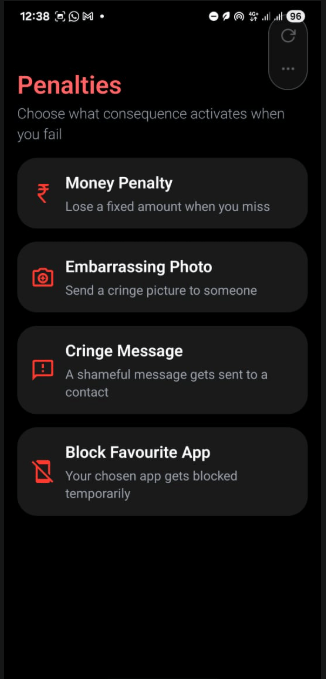
Defines what digital behaviors the user wants to restrict during the commitment. Applications:3. Penalties
If the user fails the commitment, penalties get triggered:- Money Penalty:
{ "penalty_type": "money", "amount": 500 } - Embarrassing Photo:
{ "penalty_type": "embarrassing_photo" } - Cringe Message:
{ "penalty_type": "cringe_message" } - Block Favourite App:
{ "penalty_type": "block_app" }
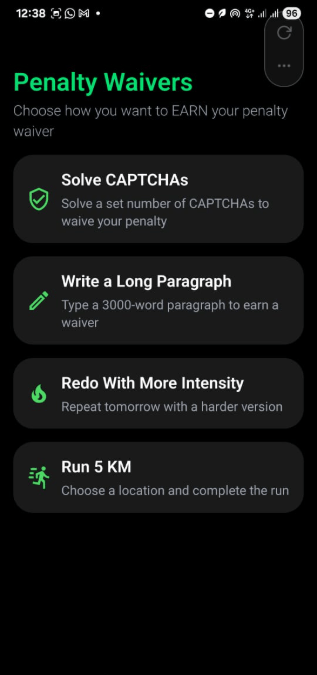
4. Penalty Waivers (Earn Your Way Out)
If you fail, you can waive the penalty by completing a challenge:- Solve CAPTCHAs:
{ "waiver_type": "captcha", "quantity": 100 } - Write Long Paragraph:
{ "waiver_type": "write_paragraph", "min_words": 3000 } - Redo With More Intensity:
{ "waiver_type": "redo" } - Run 5KM:
{ "waiver_type": "run", "distance_km": 5 }
5. Permissions Required
Full AI-Friendly Object Model
Q&A Summary
Q1: What UI page did we build first? A: The Permissions Page with all 7 required permissions. Q2: What permissions did we include? A: Camera, Location, Notifications, Alarms & Reminders, Battery Optimization, Appear On Top, Accessibility. Q3: What visual rules did we apply? A: Title color = blue if granted, red if not granted. Used existing ConditionCard. Full page scroll enabled. Q4: What did we modify in ConditionCard? A: Allowed passing custom title components and custom icon color. Q5: Which task did we decide to start next? A: Authentication (BetterAuth + Convex). Q6: Did we install all backend dependencies? A: Yes. Ranbun install inside packages/backend.
Q7: Did Convex backend start successfully?
A: Yes. bun dev logged into Convex, created the .env.local, and backend is running.
Q8: Did we create the Convex BetterAuth integration file?
A: Yes. Added convex/auth.ts with proper configuration.
Q9: Which auth provider did we enable first?
A: Google OAuth.
Q10: What did we configure inside Google Cloud?
A: Created CommitT project, set up OAuth consent screen, configured External audience.
Summary
Morning (10 AM - 12 PM):- Completed Permission Page UI
- Updated ConditionCard component
- Identified core tasks
- Installed auth dependencies
- Set up Convex backend
- Created auth configuration
- Started Google Cloud OAuth setup
- Documented entire CommitT flow in AI-friendly format
Proof of Work
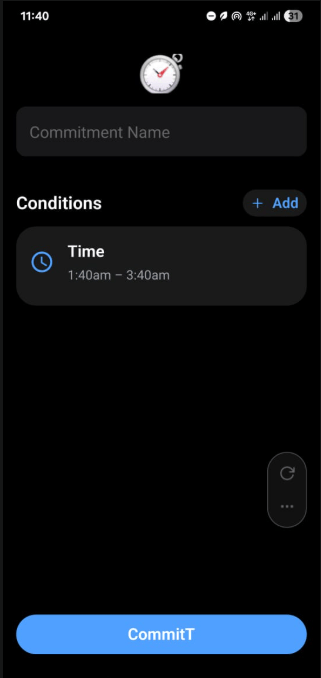
CommitT UI - Screen 1
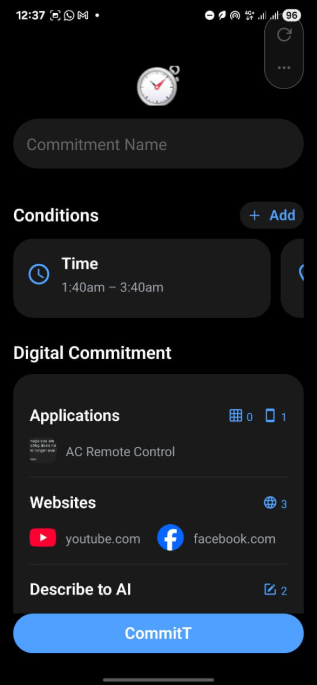
CommitT UI - Screen 2
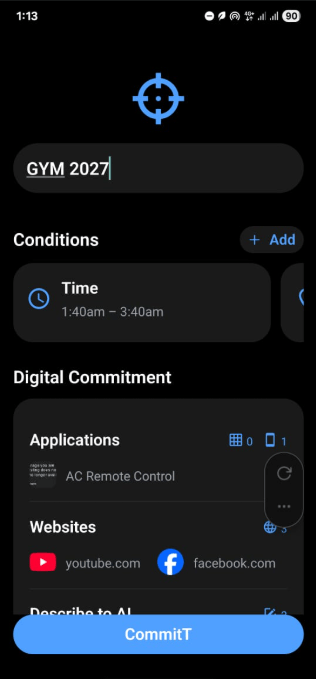
CommitT UI - Screen 3
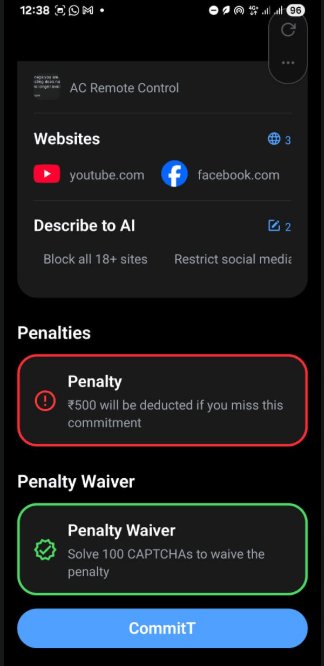
CommitT UI - Screen 4
CommitT UI - Screen 5
CommitT UI - Screen 6
CommitT UI - Screen 7
CommitT UI - Screen 8