

December 20th, 2025
The Real Blocker Wasn’t Maps — It Was Money On the third day, we stopped touching code. We stared at Google Cloud Console instead. And we found what no tutorial clearly tells you.The Discovery
Q: What did we find?
- Billing status showed Active
- APIs were Enabled
- Console didn’t throw visible errors
The Silent Block
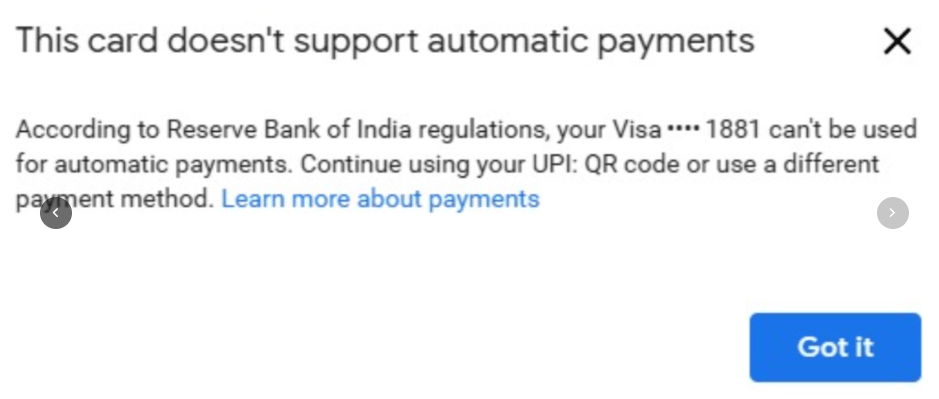
Q: How does Google actually handle this? Google silently blocks map tile serving unless:- You add an international Visa or MasterCard
- With auto-payment / e-mandate enabled
- RBI-compliant recurring payments allowed
What We Tried
Q: Did you try other cards? Yes. I even tried my brother’s Visa card.
The Clarity Moment
The map wasn’t broken. The setup wasn’t wrong. The payment method was.
The India-Specific Gotcha
Q: Why is this especially painful for Indian developers?
Your billing account can show “Active” while still silently blocking API calls.
The payment method matters more than the status badge.
Technical Summary
For anyone hitting the same wall:What These Three Days Taught Me
Q: What are the key lessons?- A blank map doesn’t mean a frontend bug
- Logs matter more than assumptions
- Cloud platforms fail silently, especially billing
- India-specific payment rules can break global services
- Building real things feels lonely before it feels rewarding
Where I Am Now
It still isn’t working. But now I know why. And that’s enough to keep going. Because these three days weren’t wasted — they taught me things no quick tutorial or exam ever did.Summary
Today was the breakthrough:- Stopped touching code, started reading billing console
- Discovered UPI/GPay doesn’t work for Maps SDK
- Understood why “Active” billing can still block tile serving
The Verdict
We did everything right technically. This wasn’t a dev mistake — it was:India-specific payment infrastructure colliding with Google’s global billing requirementsThree days. One grey map. Zero code bugs. Sometimes the hardest bugs aren’t in your code at all.